Searching for foreclosure properties in Broward County can be a useful way to identify homes, condos, and other real estate that may be going through the foreclosure process or scheduled for a foreclosure sale. However, finding a foreclosure property is not as simple as searching a regular real estate listing. Broward County maintains several public resources, and each one provides different information about a property, its owner, the foreclosure case, recorded documents, and auction status.
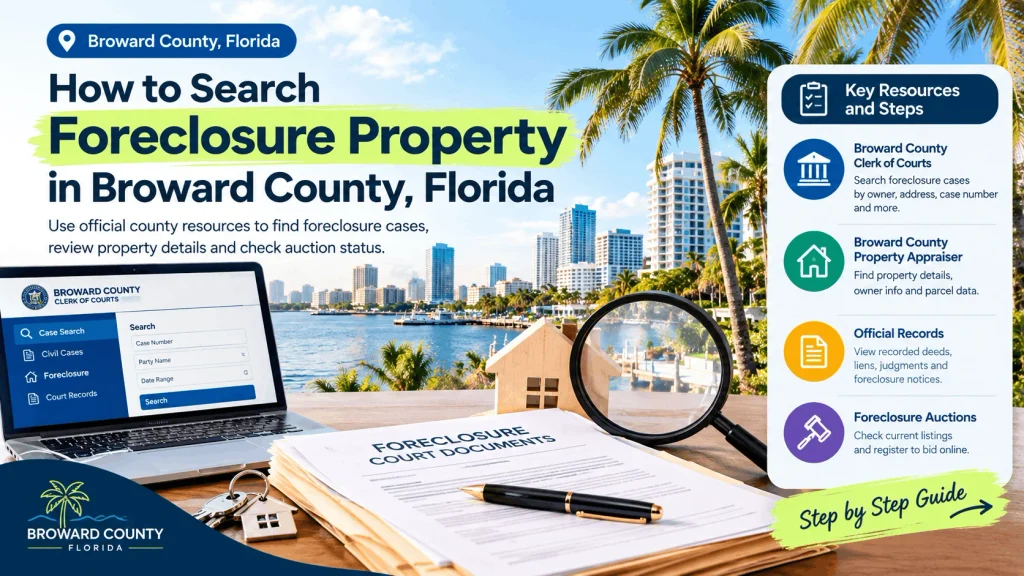
If you are learning how to search foreclosure property in Broward County, the most reliable approach is to combine the Broward County Clerk of Courts, Broward County Property Appraiser, and Broward County official records resources. These sources can help you determine whether a foreclosure case exists, identify the property involved, review recorded documents, and check whether a foreclosure sale has been scheduled.
This guide explains the process step by step, including how to search Broward County foreclosure records by owner name, address, case number, or property information.
What Is a Foreclosure Property?
A foreclosure property is real estate involved in a legal process in which a lender or other lienholder seeks to enforce its rights after a borrower fails to meet the terms of a mortgage or other secured obligation.
A property being associated with a foreclosure case does not necessarily mean it is immediately available for purchase. A foreclosure case can be filed before a final judgment or auction takes place. The case may also be resolved, postponed, dismissed, or otherwise changed.
For that reason, anyone researching a potential foreclosure property should check the current court case and recorded documents instead of relying only on a third-party listing or an old advertisement.
Where to Search Broward County Foreclosure Properties
There are several important sources to use when researching foreclosure property in Broward County.
1. Broward County Clerk of Courts
The Broward County Clerk of Courts provides public access to court case information. Its case-search system includes foreclosure-related civil case types, including several real-property and mortgage foreclosure categories.
The Clerk’s search system can be useful when you want to determine whether a foreclosure lawsuit has been filed and review available case information.
You can search using information such as:
- Owner or party name
- Business name
- Case number
- Filing date range
- Court type
- Foreclosure case type
The public case-search system also provides search tips and limits certain searches to the first 200 results, so narrowing your search criteria can make it easier to find the correct case.
2. Broward County Property Appraiser
The Broward County Property Appraiser is useful for identifying property information connected to a particular address, owner, or parcel.
The Property Appraiser’s tools allow searches by:
- Owner name
- Property address
- Property ID or folio number
- Parcel information
The county’s interactive property map also provides parcel information such as the owner, sites address, legal description, property values, sale history, and other property characteristics.
However, the Property Appraiser’s website should not be treated as a substitute for checking the actual foreclosure court case. Its purpose is primarily property assessment and property information.
3. Broward County Official Records
Recorded documents can provide another important piece of the foreclosure search.
The Broward County Property Appraiser specifically advises that recorded deeds, mortgages, liens, lis pendens, foreclosure notices, judgments, and other documents can be researched through the County Records Division. The Property Appraiser also notes that the Records Division is separate from the Property Appraiser’s Office.
These records can help you understand the history of a property and identify documents connected with a foreclosure.
4. Broward County Foreclosure Auction Information
If your goal is to find properties that are actually scheduled for foreclosure auction, you should also check the Broward County Clerk’s foreclosure-sale information.
The Clerk states that foreclosure sales are conducted online and directs bidders to the Broward foreclosure auction platform. Registration is required before participating in a sale.
This distinction is important:
A foreclosure case is not automatically the same thing as an upcoming foreclosure auction.
You should confirm the current sale information before treating a property as an auction opportunity.
Step 1: Start With the Property Address
If you already know the address of a potential foreclosure property, begin with the Broward County Property Appraiser.
Search the property using the street address and identify the corresponding property record.
The property record can help you confirm:
- Property address
- Property owner
- Folio or parcel information
- Legal description
- Property type
- Sale history
- Assessed and taxable values
- Other available property information
The Property Appraiser’s interactive map allows searches by parcel ID, owner name, and address. When searching by address, the site provides instructions for entering the house number and street name.
Why the Property ID Matters
Once you identify the property’s folio or parcel number, keep it available during the rest of your research.
A property address can sometimes appear differently across documents. The folio or parcel identifier can provide a more precise way to connect the property record with other public records.
For a serious foreclosure investigation, record the:
Property address + owner name + folio number + legal description
before moving to the next step.
Step 2: Search the Broward County Clerk of Courts
After identifying the property owner, search the Broward County Clerk of Courts case database.
The public case-search system provides several search methods. For foreclosure research, a party-name search and case-type search can be especially useful. The system includes foreclosure categories under its civil case types.
When searching by owner name, try variations carefully.
For example, if the property record shows an individual owner, search the owner’s:
- Last name
- First name
- Middle name, when available
If the property is owned by a company or business entity, use the business-name search where appropriate.
The Clerk’s search system recommends using additional information and date ranges to narrow results when necessary.
Search by Foreclosure Case Type
If you receive too many results, narrow the search by selecting an appropriate foreclosure-related civil case type.
The Clerk’s database includes categories such as:
- Real Property/Mortgage Foreclosure
- Residential foreclosure categories
- Commercial foreclosure categories
- Homestead residential foreclosure categories
- Non-homestead residential foreclosure categories
The exact case classification shown in the system can depend on the case and filing information.
Step 3: Review the Foreclosure Case
Finding a foreclosure case is only the beginning.
Open the relevant case and review the available information to determine what stage the case has reached.
Depending on the case and the level of public access available, you may find information about:
- Plaintiff
- Defendant
- Filing date
- Case number
- Court division
- Case status
- Court events
- Orders
- Judgments
- Foreclosure-related documents
- Sale information
The Broward County Clerk explains that electronic access to court records is governed by Florida court-record access standards. Some records or documents may have restricted access, and not every court document is necessarily available online.
This means that an online search result should not automatically be interpreted as a complete legal file.
Step 4: Check the Recorded Foreclosure Documents
Once you have located a potential foreclosure case, search the property’s recorded documents.
Important documents may include a lis pendens, mortgage, assignment, lien, judgment, or other recorded instrument.
The Broward County Property Appraiser’s FAQ explains that the County Records Division allows searches for recorded foreclosure notices, liens, lis pen dens, release of liens, court judgments, deeds, mortgages, and other documents.
A is pen dens can be particularly important when researching a property involved in litigation because it can provide evidence that a legal action affecting the property has been recorded.
However, a recorded foreclosure-related document should still be reviewed together with the current court case.
Step 5: Confirm Whether a Foreclosure Sale Is Scheduled
If your goal is to find a Broward County foreclosure auction property, do not stop after finding a foreclosure case.
Check the Clerk’s foreclosure-sale information to determine whether a sale has been scheduled.
The Broward County Clerk explains that bidders participating in foreclosure sales must register through the county’s online foreclosure auction system. The Clerk also states that bidders are responsible for conducting their research about the property.
This is one of the most important steps for potential auction bidders.
A property may appear in foreclosure records without currently being scheduled for an auction. Conversely, an auction listing can contain information that needs to be compared against the underlying court case and property records.
Always verify the current sale information before making financial decisions.
Step 6: Research the Property Before Considering a Purchase
Finding a foreclosure auction does not mean you have completed your research.
Before considering a purchase, investigate the property itself.
Useful information to review includes:
Property ownership
Confirm the owner shown in the Property Appraiser’s records and compare it with the names appearing in the court and recorded-document records.

Property characteristics
Review the property’s:
- Building type
- Lot size
- Living area
- Year information
- Property use
- Assessed value
- Taxable value
- Sales history
The Broward County Property Appraiser’s records can provide many of these property details.
Recorded documents
Look for mortgages, liens, judgments, releases, deeds, and foreclosure-related filings.
Court case
Review the foreclosure lawsuit and its current status.
Auction information
If a sale is scheduled, verify the sale date and current auction information through the Clerk’s foreclosure-sale resources.
Step 7: Understand the Difference Between Foreclosure and Tax Delinquency
One common mistake is assuming that every property with unpaid taxes is a mortgage foreclosure property.
Mortgage foreclosure and tax-related property issues are different processes.
A mortgage foreclosure generally involves enforcement of a mortgage or other secured debt through a court case. A tax-related issue can involve delinquent property taxes and a separate legal process.
Therefore, if your goal is specifically to find foreclosure homes in Broward County, make sure the records you are researching actually relate to a mortgage or real-property foreclosure rather than simply unpaid taxes.
Step 8: Search Foreclosure Properties by Owner Name
Sometimes you do not have a property address but know the name of an owner.
In that situation, the Broward County Clerk’s party-name search can be useful.
Start by searching the owner’s name and narrowing the results using:
- Civil court type
- Foreclosure case type
- Filing date range
The Clerk’s system requires specific name-search fields and provides search guidance for narrowing results.
After identifying a possible foreclosure case, use the case information to identify the property involved.
You can then use the property address or folio number to research the parcel through the Broward County Property Appraiser.
This creates a useful chain:
Owner Name → Foreclosure Case → Property Address → Property Record → Recorded Documents → Auction Status
Step 9: Search Foreclosure Properties by Case Number
If you already have a Broward County foreclosure case number, searching becomes much easier.
Enter the case number into the Clerk’s case-search system.
The Clerk provides specific formatting requirements for civil case numbers and notes that case numbers should be entered without spaces, dashes, or other characters.
A case-number search can help you avoid confusion when multiple people have similar names.
After locating the case, record the property address, parties, filing information, and other relevant details.
Step 10: Check for Updated or Missing Records
Public-record research is not always as simple as finding one document.
The Broward County Clerk notes that not all court records and documents are necessarily available through the public online system, and access can vary according to Florida’s electronic-record access standards.
The Clerk also provides a records-request process for documents that are not available through ordinary online access.
If an important document appears to be missing, do not assume that the document does not exist.
Instead, check whether:
- The document is available through another official records’ system.
- The court record has restricted electronic access.
- A record’s request is necessary.
- The case has a different number or party name.
- The property has changed ownership.
- The foreclosure case has been dismissed, resolved, or otherwise changed.
Common Mistakes When Searching Broward County Foreclosures
Mistake 1: Using only real estate websites
Third-party foreclosure websites can be useful for discovering potential properties, but they should not replace official public-record research.
Listings can become outdated.
Mistake 2: Assuming a foreclosure case means an auction is scheduled
A foreclosure lawsuit and a foreclosure auction are different stages.
Always verify the current sale information.
Mistake 3: Ignoring the property record
The court case tells you about the legal action, while the Property Appraiser can help you identify and understand the property itself.
Use both sources.
Mistake 4: Not checking recorded documents
A property can have other recorded instruments that are important to your research.
Review the available deeds, mortgages, liens, lis pendens, judgments, and related documents.
Mistake 5: Relying on an old auction date
Foreclosure cases can change. Verify the current auction information before relying on a previously published sale date.
Mistake 6: Assuming the assessed value equals market value
A county property assessment is not automatically the same as the property’s current market value or potential auction value.
Treat property valuation as a separate research question.
How to Research a Broward County Foreclosure Property Step by Step
For a simple workflow, use this checklist:
1. Find the property.
Start with the address, owner name, or property identifier.
2. Search the Property Appraiser.
Confirm the parcel, owner, address, folio number, and property information.
3. Search the Clerk of Courts.
Look for foreclosure-related civil cases using the owner name, business name, or case number.
4. Review the case.
Check the filing information, case status, available documents, and court activity.
5. Search recorded documents.
Look for foreclosure notices, lis pendens, mortgages, liens, judgments, deeds, and related records.
6. Check auction status.
If you are looking for a property scheduled for foreclosure sale, verify the current sale information through the Clerk’s foreclosure-sale resources.
7. Investigate the property.
Review property characteristics, sales history, taxes, liens, occupancy, condition, and other relevant issues.
8. Get professional advice when necessary.
For a significant purchase, consider obtaining advice from a qualified real estate attorney, title professional, licensed real estate professional, or other appropriate specialist.
Final Thoughts
Learning how to search foreclosure property in Broward County becomes much easier when you understand which public source provides which type of information.
The Broward County Property Appraiser can help you identify the property, owner, folio number, address, sales history, and other parcel information. The Broward County Clerk of Courts can help you locate foreclosure cases and review available court information. Broward County’s recorded-document resources can provide additional information about deeds, mortgages, liens, lis pen dens, judgments, and foreclosure-related filings.
If your goal is to purchase a property at foreclosure auction, take the additional step of checking the current foreclosure-sale information and completing your research. The Clerk specifically places responsibility on bidders to conduct their property research.
The safest research process is therefore:
Find the property → confirm the parcel → search the foreclosure case → review recorded documents → verify auction status → investigate the property → obtain professional advice when needed.
Because foreclosure information can change as a case progresses, always verify important information against the most current official records before making a purchase, bidding at an auction, or relying on a foreclosure listing.
Frequently Asked Questions About Broward County Foreclosures
How can I search foreclosure properties in Broward County?
You can begin with the Broward County Clerk of Courts for foreclosure cases, the Broward County Property Appraiser for property information, and Broward County recorded documents for deeds, mortgages, liens, lis pendens, judgments, and foreclosure-related records.
Can I search Broward foreclosure records by address?
An address is useful for identifying the property through the Broward County Property Appraiser. Once you have the owner or property information, you can use that information to locate the associated foreclosure case and recorded documents.
Can I search Broward foreclosure cases by owner name?
Yes. The Broward County Clerk’s public case-search system provides a party-name search. You can narrow results using court type and filing dates when necessary.
Where can I find Broward County foreclosure auctions?
The Broward County Clerk provides foreclosure-sale information and directs prospective bidders to the county’s online foreclosure auction platform. Registration is required to participate in a sale.
Is every property in a foreclosure case available for auction?
No. A foreclosure case does not automatically mean that the property is currently scheduled for an auction. The current case status and foreclosure-sale information should be verified before treating a property as an auction opportunity.
Can I see foreclosure documents online?
Many electronic court documents and recorded documents can be accessed online, but availability depends on the type of record and applicable access rules. The Clerk notes that some records may have restricted access.
Should I research liens before buying a foreclosure property?
Yes. A foreclosure purchase can involve legal and financial issues that require careful due diligence. Review available recorded documents and court information, and consider professional title and legal advice before proceeding.